Dimensioning will be checked by default. To turn it off just click the Show/Hide Layers button to the left.
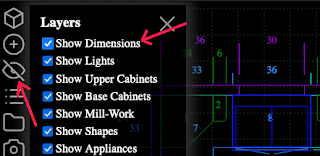
Dimensioning will be checked by default. To turn it off just click the Show/Hide Layers button to the left.
If you ever loose sight of an item or make it so small that you can't click on it you can still find it in the All Items list.

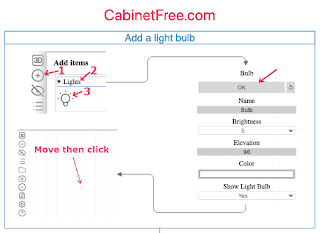
I put together a simple 'Getting Started' tutorial. You can find it here or in the help menu a www.CabinetFree.com.
I have added dimensioning to CabinetFree.com. This will only work with newly added items. To turn it on click the Show/Hide Layers button then check Show Dimensions. In a few weeks it will be checked by default.

It's easy to see at a glance what you haven't cut yet. If you only cut one of two parts in a cell highlight only half of the cell.

To get the best performance use Google's Chromium browser.
It's the browser that is the base for Microsoft's Edge browser and Google's Chrome browser as well other browsers like Brave.
But for everything else I'd recommend FireFox.


